
If you are still deciding whether to leave QuickBooks, there are twelve articles for that. The best ranked page with "Converting" in its title is a form (nextecgroup.com, position 5) that emails you a guide promising "the 6 signs it's time to move on from QuickBooks."
This is for the person who already decided. Go-live is in eleven weeks and the opening trial balance has to tie.
The short answer. Six things decide a QuickBooks to manufacturing ERP go-live date: opening balances, the inventory valuation method change, work in progress that QuickBooks does not track at all, open purchase orders and partial receipts, customer deposits, and payroll. None of them are data migration. Each is a decision somebody in your business has to make.
Last updated: 20 August 2026.
1. Opening balances
You are re-establishing a balance sheet, not migrating one.
- Some accounts will not reconcile to the penny. Reconcile what is material, book the residue to a named suspense account, and date the plan to clear it
- Sub-ledgers must tie to control accounts. AR must equal the open invoices you loaded. Same for AP and inventory
- Somebody will post to QuickBooks after the cut date. Decide in writing whether it goes read-only
2. Inventory valuation
QuickBooks Desktop and Enterprise use average cost, with FIFO in Enterprise via Advanced Inventory. Online uses FIFO.
Moving to standard costing is a change of accounting method, the same class of decision as leaving a platform like NetSuite. Your opening inventory value changes, your first variance reports look alarming because QuickBooks was absorbing all of it into average cost, and somebody has to set standards, which means a costed BOM for every made item.
Not ready? Run average costing for year one and move later with clean data.
3. Work in progress
Your factory has WIP anyway, so there is nothing to migrate, only something to count. Count it physically on the cut date, value it, and load it as opening stock. Schedule the count at your WIP low point: that is the difference between a day and three.
4. Open POs and partial receipts
The partials are the problem.
A PO for 1,000 with 600 invoiced, 200 received unbilled and 200 outstanding becomes an order for 200 plus a goods-received-not-invoiced accrual. That accrual is easy to miss, and when it is missed it surfaces at the first close, when AP does not tie.
Your PO numbers will change. Tell suppliers before go-live.
5. Customer deposits
Customer deposits are the trap. They are recorded several ways depending on who set the file up, and at least one of those ways is wrong. List every customer with a credit balance and establish what each one is. A prepayment, a return credit and an unchased duplicate payment look identical on an aging.
6. Payroll, which you should leave alone
ERPNext has payroll and it works. What it is not is a US tax filing engine: no 941, no multi-state withholding registration, no W-2s.
Keep your existing provider, post a summary journal, reconcile monthly. That is a short task per cycle, and it removes an entire category of go-live risk. Payroll errors are the only ERP errors that produce a queue outside the controller's office within a day.
| Item | QuickBooks does | The ERP needs | Who decides |
|---|---|---|---|
| Opening balances | Closes with drift in old clearing accounts. | Sub-ledgers tying to control accounts. | Controller |
| Inventory valuation | Average cost on Desktop, FIFO on Online. | A method decision, and costed BOMs. | Controller |
| Work in progress | Nothing. Assemblies build in one step. | A physical count, valued and loaded. | Plant manager |
| Open POs | Non-posting, so nothing carries. | Remaining quantity plus a GRNI accrual. | Purchasing, AP |
| Deposits | Recorded several ways, at least one wrong. | Every credit balance classified. | Controller |
| Payroll | Runs separately and files your taxes. | Nothing. Leave it. | You |
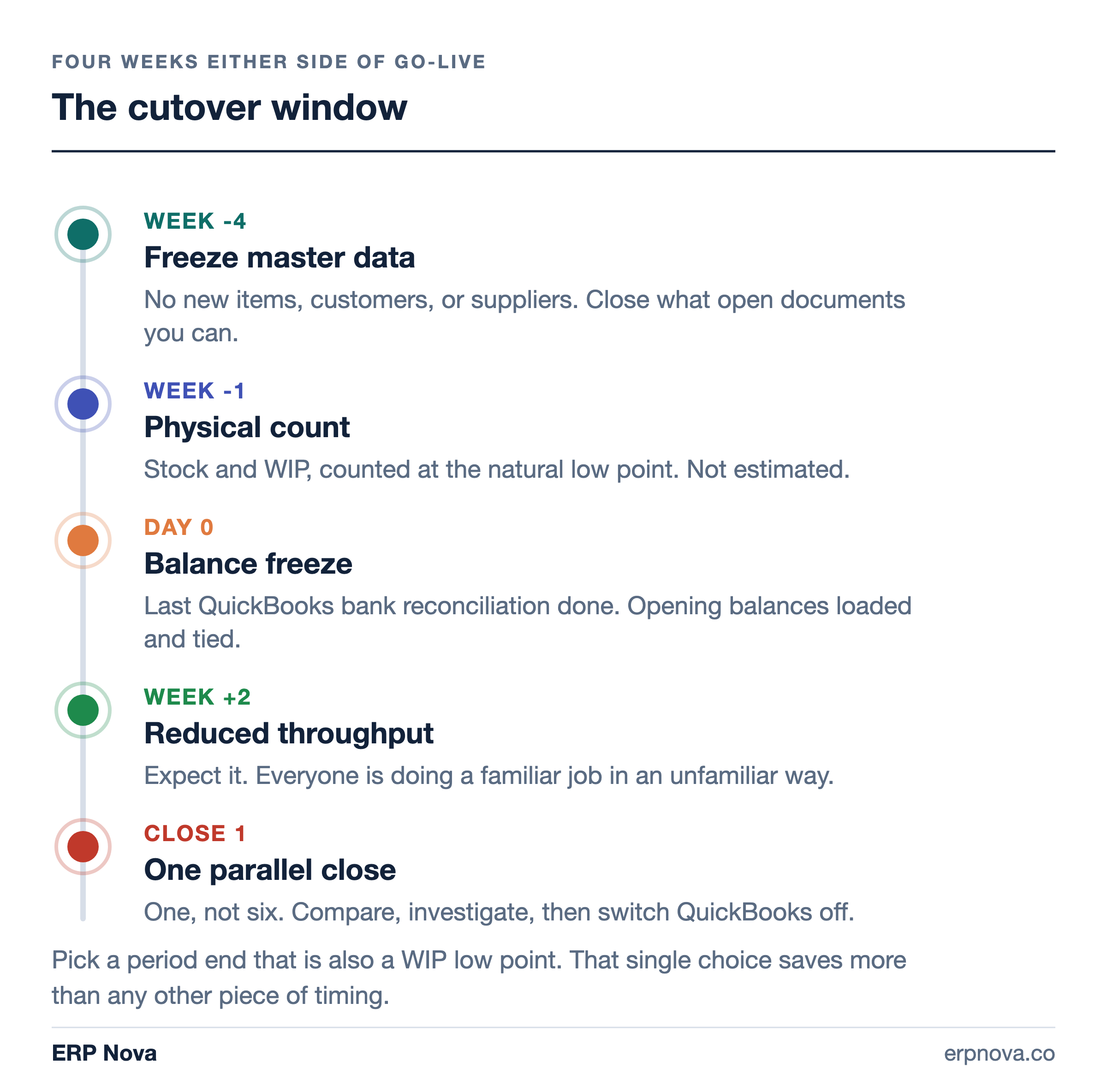
Choosing the date
A period end, ideally fiscal year end. A WIP low point: shutdown, maintenance week, slow season. Not during your audit, busy season, or your controller's leave.
After go-live, expect throughput to drop for two to three weeks. Then run one close in both systems, compare, and switch QuickBooks off.
Start with three numbers
How many open POs. How many customers hold a credit balance. What is WIP worth on an average Tuesday.
If those take longer than an afternoon, that is not a reason to delay. It tells you where your cutover will spend its time.
Send us those three numbers and we will tell you whether the go-live date you have in mind survives your WIP count. And if the answer is that your date is fine and payroll should stay where it is, that is a twenty minute call and no project. erpnova.co
Frequently asked questions
What breaks when you migrate from QuickBooks to a manufacturing ERP?
Six things, none of them the data load. Opening balances, the inventory valuation method change, work in progress, open purchase orders, customer deposits, and payroll.
Does QuickBooks track work in progress?
No. Enterprise builds assemblies in one step with no partial completion or routing. On cutover day you have physical WIP and no system record, so it must be counted and valued.
What inventory costing method does QuickBooks use?
Desktop and Enterprise use average cost, with FIFO available in Enterprise. Online uses FIFO. Moving to standard costing is a change of accounting method and restates opening inventory.
Should you move payroll during an ERP migration?
Usually not. ERPNext payroll is not a US tax filing engine. Keep your provider, post a summary journal, and remove a whole category of go-live risk.
About ERP Nova
ERP Nova is the ERPNext implementation practice of Vish Gyana Technology Solutions, an official Frappe Partner. We work with mid-market manufacturers in CPG and food, pharma, and electronics. erpnova.co
Comments
Join the discussionNo comments yet. Be the first to comment.